The Unity Architecture I Reuse Across Casual Game Projects
The Unity Architecture I Reuse Across Casual Game Projects
ThienTm27 aka Denk🧩 Why bother with a standard architecture?
After shipping several casual/hyper-casual projects, I learned that without a clear framework from day one, code turns messy fast — especially when handing off, extending features, or coming back to fix things months later. This post walks through the code structure I reuse in most of my projects, along with real code samples.
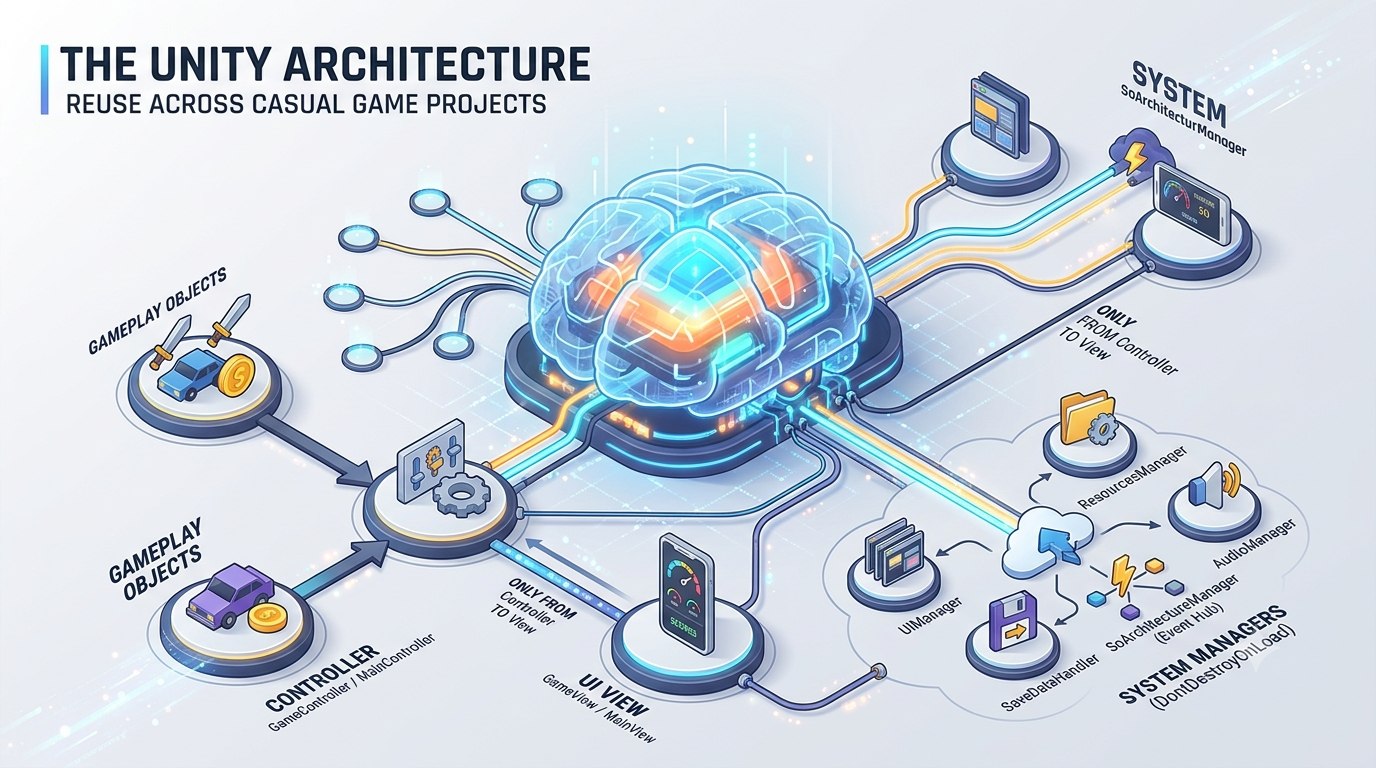
📌 Overall system diagram
🏗️ Core principle: the Controller is the single point of communication
The most important rule in this architecture: objects inside a scene are never allowed to call GUI/View directly. Every interaction between gameplay and UI must go through that scene’s Controller.
1 | Gameplay Object (e.g. CarController) |
For example, inside GameController, every frame it pulls data from CarController and pushes it to GameView to render — CarController never calls GameView directly:
1 | private void UpdateGameplayStats() |
The benefit: gameplay logic stays fully decoupled from UI. Swapping the UI or adding a new view never requires touching gameplay logic.
🔁 The Singleton system — 3 flavors for 3 different lifetimes
I keep a single BaseSingleton.cs file defining 3 kinds of singleton, picked depending on the lifetime I need:
| Type | Behavior | Used for |
|---|---|---|
Singleton<T> |
Plain class (where T : new()), creates its own instance lazily |
Pure logic classes that don’t need MonoBehaviour |
ManualSingletonMono<T> |
Only returns an instance that already exists in the scene — never creates one, logs an error if missing | Manager classes that must be set up in a scene/prefab (UIManager, ResourcesManager, GameController…) |
AutoSingletonMono<T> |
Automatically spawns a new GameObject if no instance exists yet | Utility helpers that don’t need manual setup |
The neat part: ManualSingletonMono<T> never calls DontDestroyOnLoad itself — whether it persists across scenes is entirely decided by where it’s instantiated (see the Entry Scene section below), not by the Singleton base class.
🚪 Entry Scene — where every persistent system gets bootstrapped
The very first scene (Entry) has one job: show a loading bar, then DontDestroyOnLoad a single manager prefab holding every system-level Manager, before switching to the Main scene.
1 | private void Awake() |
Thanks to this, the managers below live for the entire lifetime of the app, independent of scene reloads:
- UIManager — manages every Canvas in the game (View + Popup + Alert), spawned from the Entry scene,
DontDestroyOnLoad. - ResourcesManager — stores and manages shared ScriptableObjects,
DontDestroyOnLoad. - SoArchitectureManager — the event hub (Scriptable Object Architecture),
DontDestroyOnLoad. - SaveDataHandler — reads/writes local save data (PlayerPrefs),
DontDestroyOnLoad. - AudioManager — manages background music and sound effects,
DontDestroyOnLoad. - GameConstants — shared constants: scene names, popup resource paths…
🎮 Controller — the brain of each scene
Unlike the Managers above, a Controller is a singleton but is NOT DontDestroyOnLoad — it only lives within its own scene (MainController for the Main scene, GameController for the Game scene).
1 | public class GameController : ManualSingletonMono<GameController> |
The Controller’s job:
- Acts as the only bridge between the current scene and the
DontDestroyOnLoadManagers above (UIManager, SoArchitectureManager…). - Drives input, gameplay state (pause/resume/end game), and pushes data to the matching View.
- Registers/unregisters events right inside
RegisterEvents()/UnregisterEvents()— preventing listener leaks when switching scenes.
🖼️ The UI system: UIManager → ViewManager & PopupManager
UIManager
UIManager is a DontDestroyOnLoad singleton holding references to 3 sub-managers: ViewManager, PopupManager, AlertManager. It also handles the loading screen and scene-transition effects (using DOTween scale in/out).
View — a full-screen canvas per scene
UIViewManager manages Views (full-screen canvases per scene, e.g. MainView, GameView). Built-in features include:
- A history stack of shown views (
LastShownView) to support a Back button. HideOthersView()auto-hides other views when showing a new one, avoiding overlapping UI.OnShownCallBack/OnHideCallBackcallbacks to keep the topbar and back button in sync.
Popup — toggle on/off and reused
UIPopupManager manages Popups (SettingPopup, ShopPopup, TutorialPopup, UpgradePopup…) using 2 dictionaries:
_dictPopup: caches created popup instances → reused instead of being recreated over and over._dictPopupControllers: dedicated controllers driving the show/hide/animation logic for each popup.
1 | public UIPopup GetPopupFromCacheOrCreate(UIPopupName name) |
Each Popup inherits from UIPopup and overrides OnShowing() / OnHiding() to handle its own logic (e.g. SettingPopup pauses/resumes the game automatically when opened/closed).
📡 Data & Events: SoArchitectureManager, ResourcesManager, SaveDataHandler
SoArchitectureManager — an Observer pattern built on ScriptableObjects
Instead of systems calling each other directly (which quickly creates tangled dependencies), everything communicates through a GameEvent ScriptableObject:
1 | public class SoArchitectureManager : ManualSingletonMono<SoArchitectureManager> |
Anything can AddListener/RemoveListener or Raise() without knowing who’s listening — reducing coupling between systems (Controllers, Views, and Popups can all listen to OnMoneyChangedEvent without holding a direct reference to each other).
ResourcesManager
A single place to store and load ScriptableObjects shared across the whole game (item data, config…), instead of scattering Resources.Load calls everywhere.
SaveDataHandler
Persists local data via PlayerPrefs + JsonUtility, auto-saving on app pause/quit/disable, and exposing RequestSave() to batch multiple changes and save once in Update() instead of saving on every single change (which would cause hitches):
1 | private void Update() |
🔊 AudioManager
Manages background music and sound effects (SFX), keeps separate volume settings for music/SFX, and is called directly by Popups/Views whenever needed (e.g. SettingPopup syncs the volume sliders, GameView plays an SFX on button press).
🧰 Shared Utilities
- SimplePool — a lightweight object pool, avoiding repeated Instantiate/Destroy calls (extremely handy for bullets, coins, or any object that spawns constantly in a casual game).
- SafeArea — automatically fits UI to the screen’s safe area on notched devices, attached directly to the RectTransform of whichever panel needs it.
✅ Summary: a full play session flow
- Entry scene →
EntryControllershows the loading bar,DontDestroyOnLoads themanagerprefab, then loads theMainscene. - Main scene →
MainControllershowsMainView, waiting for the player to hit Play. - Pressing Play →
UIManager.Instance.ShowTransition()→ loads theGamescene. - Game scene →
GameControllershowsGameView, registers events fromSoArchitectureManager, and every frame pushes gameplay data (CarController) toGameViewto render. - Game over →
GameController.ShowEndGame()→UIManager.Instance.PopupManager.ShowPopup(...).
Throughout this whole flow, every piece only talks to the others through Controllers + Managers + Events — no gameplay object ever reaches into the UI, and no UI ever reaches into gameplay.
🎯 When is this architecture worth it?
Best suited for:
- Casual/hyper-casual projects that need to move fast with several simple scenes (Entry → Main → Game).
- Small teams that need a shared standard new members can onboard onto quickly.
It can feel like overkill for a tiny 1-2 screen prototype — in that case, dropping the Controller/Event layer and calling things directly is often faster.
This post is based on the code framework I keep reusing across projects at Denk Studio.